Crime Outline Vector Icons: A Designer’s Guide to Clean, Editable Security Imagery
Every creative professional has faced the moment when a project calls for a subtle yet unmistakable visual cue—something that signals caution, investigation, or digital protection without overwhelming the overall design. A bold lock icon might work for a banking app, but a sleek outline version can convey the same message with a lighter, more contemporary feel. This is where the Crime Outline icon set enters the picture, offering 200 well-crafted vector symbols that bridge functional clarity and modern minimalism. Built to be fully scalable and endlessly editable, the collection speaks to designers, educators, content creators, and business owners who need crime- and security-themed graphics that adapt across screens, paper, and even social media banners without losing integrity.
Why Outline Style Icons Are Essential in Visual Communication
Outline icons have become a staple in user interface design, editorial layouts, and infographics because they communicate concepts with restraint. Unlike filled or glyph-style icons, outlines keep backgrounds transparent and rely on the weight of a single stroke to deliver meaning. This characteristic makes them ideal for layered compositions: place a magnifying glass or handcuffs icon over a photograph, and the image beneath remains visible, preserving depth. The Crime Outline set fully embraces this philosophy, offering a uniform stroke thickness that can be easily adjusted, so every symbol—whether a fingerprint, a police badge, or a caution tape—maintains visual harmony across a multi-screen app or a printed flyer.
Moreover, outline style icons allow for flexible colorization. By changing the stroke color in vector software, a designer can instantly shift the mood from corporate blue for a cybersecurity report to a stark red for an alert poster. Since the icons are entirely vector-based, they never pixelate, even when enlarged for exhibition banners or reduced for mobile menu bars. The inherent scalability means the Crime Outline pack works equally well for a book publisher illustrating a true-crime chapter opener and for a startup crafting an onboarding screen for a safety app.
Inside the 200-Icon Collection: Scope and Visual Language
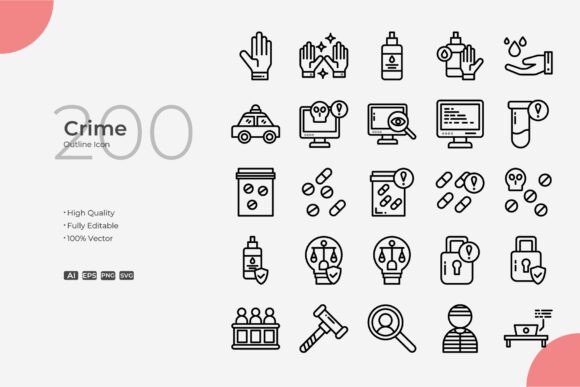
The set includes a comprehensive array of symbols that go far beyond the obvious badges and sirens. You’ll find investigative tools like magnifying glasses, evidence bags, and fingerprint scanners; legal symbols such as gavels, courthouses, and balance scales; cybersecurity staples including shields, locked folders, and firewalls; and even street-level imagery like police cars, warning lights, and barrier tape. What makes the collection cohesive is the consistent use of clean, geometric linework. The stroke ends are rounded or sharp depending on the symbol, but the overall weight stays balanced so that a crime outline of a lock feels visually equivalent to a crime outline of a document shredder, even when displayed side by side in an infographic about identity theft prevention.
This breadth means you rarely need to supplement the pack with mismatched icons from free libraries. For a single project that moves from a website to a printed brochure to a social media carousel, the visual consistency remains intact because each icon shares the same DNA: a minimal footprint, open space inside the shapes, and no unnecessary flair. The visual language leans toward neutral rather than stylized, which helps the icons blend into corporate reports, educational materials, and even casual blog illustrations without imposing a particular era or trend.
Technical Specifications That Support Real-World Workflows
Designers often hesitate when they encounter icon bundles that only come in one proprietary format. The Crime Outline package avoids that pitfall by including source files in Adobe Illustrator (AI), EPS Version 10, and SVG. These formats cover nearly every professional and open-source workflow imaginable. The AI file, fully editable in Illustrator, preserves all layers and stroke attributes, so adjusting corner rounding or stroke width on a set of 20 icons can be done through global edits rather than manual tweaking. The EPS format ensures compatibility with older print software like CorelDRAW, and the SVG version opens directly in web browsers, making it simple to inspect, inline, or style with CSS for interactive projects.
One crucial detail that separates a well-built icon pack from a mediocre one is the stroke-editable nature. In vector terms, outlining strokes can turn them into filled shapes, which then lose the ability to be uniformly resized or recolored without distortion. The Crime Outline icons keep strokes as live paths, meaning you can increase the stroke weight to achieve a bolder look for a poster title or decrease it for a subtle map marker—all while preserving crisp corners and clean joins. This editable stroke quality, combined with the high vector faithfulness, makes the collection genuinely customizable rather than just downloadable artwork.
Practical Customization Using Adobe Illustrator or CorelDRAW
Opening the AI file gives immediate access to each icon as a grouped object. If you need to create a five-icon sequence for a presentation, you can simply drag the desired symbols to a new artboard. Color changes are a matter of selecting the stroke and picking a new swatch; because the icons are all stroke-based, no filling or complex masking is required. For those who work in CorelDRAW, the EPS Version 10 file imports cleanly, and the same stroke-editing capabilities apply—though Corel users might prefer to convert the EPS into CDR format first for easier layer management.
For web developers, the SVG files are a gift. You can open any icon in a code editor, see the clean path data, and directly manipulate attributes like stroke-width or stroke-linecap without touching a graphic tool. This also makes it possible to animate the icons with CSS or JavaScript—imagine a shield icon that slowly fills its color on scroll, or a fingerprint that reveals itself line by line. Because the Crime Outline SVGs use human-readable code without excessive clutter, custom animations remain lightweight, which is essential for performance-sensitive mobile sites.
Media and Project Types That Benefit Most
The versatility of the icon set becomes obvious when you map it against different output channels. Below are the most common use cases, each drawing on the pack’s clean aesthetic and drag-and-drop readiness:
- Web and mobile app interfaces: Navigation menus, status indicators, permission prompts, and help sections all thrive on outline icons. A lock icon in a login field or a bell icon for alerts fits naturally without competing with text.
- Print materials like flyers, posters, and banners: High-resolution vector output means a crime-themed event poster can feature a huge fingerprint pattern that remains razor-sharp even at A2 size. The icons can be overlaid on dark backgrounds since they carry no fill.
- Social media and infographics: Data-driven posts about cyber threats or community safety statistics gain instant clarity with relevant symbols. A series of icons can form a visual checklist or a timeline without relying on stock photos.
- Educational and publishing contexts: Textbook diagrams, safety manuals, and crime prevention guides often need simple, unambiguous symbols that translate across age groups and languages. Outline icons avoid the distraction of complex shading.
- Branding and identity systems: A security consultancy or a legal firm could adapt the badge, shield, or justice scale icons for part of their visual identity. With stroke editing, the icons can be aligned exactly with brand color palettes.
For each scenario, the process remains essentially the same: locate the icon, drag it onto your canvas, resize without loss, and tune the stroke to match surrounding typography or graphic elements. The Crime Outline collection accelerates this because all icons already sit on the same artboard layout, so you aren’t hunting through zipped folders with inconsistent naming.
Ensuring Visual Consistency Across Large Projects
One underappreciated challenge in multi-page print collateral or multi-screen apps is maintaining exact icon proportions. A lock icon used on a login page should look identical to the same lock in a confirmation email, but if stroke weights drift by even 0.25 pt, the user’s eye detects the inconsistency subliminally. The Crime Outline set mitigates this by establishing a consistent base stroke weight across all files. Once you decide to scale that weight up or down for a particular medium, you can apply the change globally using Illustrator’s select-similar-stroke commands and then export—ensuring every icon, from a tiny document shredder to a large police badge, shares the same updated stroke value.
Color assignments also benefit from this uniformity. When placing icons on a dark user interface, you might set the stroke to a soft white or light gray globally. For a printed report, you could switch to a deep charcoal. Because the icons carry no embedded fills, you never risk an unwanted white box appearing behind a symbol when exporting for web. The transparent background nature of SVGs and EPS files means you can compose the icons over gradients, photographs, or solid colors without extra masking steps.
Working Smarter with Drag-and-Drop Compatibility
The phrase “drag and drop” can sometimes sound trivial, but in fast-paced design environments it matters. The Crime Outline SVGs can be pulled directly into popular presentation software like Keynote or PowerPoint, where they remain editable as native shapes. A security awareness trainer building a slide deck can drag the phishing email or firewall icons right onto slides and color them to match the corporate template—no file conversion needed. Similarly, UI designers using Figma or Sketch can drag the SVG into the canvas; even though the files don’t come in those proprietary formats, the SVG import preserves everything. This flexibility reduces the need for intermediate software and keeps the creative flow uninterrupted.
For those printing at a professional print shop, the EPS file remains the gold standard. Many large-format printers still prefer EPS Version 10 because it contains pure PostScript information that renders predictably on high-end RIPs. Whether you’re creating a vinyl banner for a neighborhood watch event or a foam board display for a legal seminar, the Crime Outline EPS file delivers crisp output that won’t be rejected due to missing fonts or unsupported effects.
Common Design Considerations and How the Set Addresses Them
Designers often worry about the balance between line detail and recognizability at tiny sizes. An overly complex icon, like a magnifying glass with a textured handle, can collapse into a blob at 16px. The Crime Outline icons are built with minimalism in mind: they strip away unnecessary interior lines, leaving only the essential contour. A judicial gavel icon, for example, uses a single continuous outline to define the head and handle, with just enough detail to distinguish it from a mallet. This restraint ensures that even at small mobile icon sizes, the symbol remains identifiable without turning into an amorphous shape.
Another typical concern is licensing confusion. While the specific license terms of any commercial product must be checked, a well-prepared icon pack like this typically allows broad commercial use in projects ranging from client websites to merchandise. The inclusion of editable source files suggests a focus on empowerment rather than restriction, giving creatives the freedom to modify the icons to the point where they become unique design elements rather than stock assets.
For those who prioritize accessibility, outline icons present a unique advantage when paired with sufficient contrast. Because the visual information rests on the stroke alone—not on subtle color fills—a user with low vision or color blindness can still perceive the shape when the stroke is thick enough and the background contrast is high. Designers can increase the stroke weight specifically for accessibility modes, and the icon retains its character.
Integrating the Icons into a Larger Design System
Design systems, whether built for a single product or a family of brands, rely on a consistent set of atomic elements. Icons are often the most visible part of that system. Adopting the Crime Outline set means you gain an instant sub-library of security-themed symbols that already adhere to a geometric, lined style. If the rest of the system uses filled icons, you can mix and match thoughtfully—perhaps keeping critical alerts in filled style and supplementary crime-related concepts in outline—to create visual hierarchy. With the AI source file, a design systems manager can rename layers, group icons into logical categories like “investigation,” “legal,” and “cyber,” and export them as component libraries for Sketch or XD via SVG conversion.
This repurposing also extends to animated interfaces. A checkout flow for a security product might use an outline shield icon that animates into a filled, checkmark version upon successful payment verification. Because you have full access to the stroke paths, you can break the icon into segments for staggered animation or add a gentle dashoffset effect, making the design feel dynamic and thoughtfully crafted.
The Broader Appeal for Non-Designers
Business owners, event organizers, and educators who don’t regularly open Illustrator still benefit from vector icon packs when they work with contracted designers. Providing a ready-made, cohesive icon set to a freelance graphic designer can reduce back-and-forth and ensure the final output aligns with the vision. A community watch coordinator might hand the Crime Outline SVG folder to a designer creating a safety awareness website; the designer can then effortlessly pull relevant icons without spending hours hunting for royalty-free alternatives. The source file availability also means that future edits by different designers won’t require decoding someone else’s outlined art—the live strokes remain modifiable indefinitely.
Even content creators on platforms like Canva or Adobe Express can leverage the SVG files to bypass the limits of built-in icon libraries. Uploading a few well-chosen SVG icons gives YouTube thumbnails or Instagram story graphics a professional, branded look that sets them apart from generic template icons. The clean, uncluttered outline style aligns particularly well with minimalist content trends where viewers expect clarity over decoration.
Preserving Quality from Concept to Final Deliverable
All these advantages hinge on the quality of the vector construction, and here the Crime Outline set performs reliably. Paths are free of unnecessary anchor points that cause bloat, and joins are smooth. When you zoom into 1600% in Illustrator, the curves remain true, which matters for large-format printing where any imperfection becomes conspicuous. The editable stroke feature is not just a bullet point—it’s a fundamental time-saver. Instead of tracing images or expanding strokes to create variations, you adjust a single parameter and export. This speed becomes especially noticeable when preparing localized versions of a document or app: a set of 20 icons for an English interface can be recolored and exported for a high-contrast German version in minutes.
For teams managing multilingual websites, the SVG format also allows for easy text-free icons, which are essential for internationalization. The symbols themselves carry no language, so a police badge works in Tokyo as well as in São Paulo. Combined with the ability to tweak visual weight to match surrounding typography, the icon set becomes a cross-cultural asset.
Ultimately, the Crime Outline vector collection answers a recurring creative need: a dependable, high-quality, and thoroughly editable set of security and justice imagery that doesn’t lock you into a single use case or software ecosystem. From the initial concept sketch to the final SVG rendered on a mobile device, the icons remain as crisp and adaptable as the day they were opened. Whether you’re designing a true-crime podcast cover, a mobile banking interface, an educational thief-awareness poster, or a legal brochure, the pack grants you the raw materials to build a visual narrative that is consistent, professional, and undeniably clear.