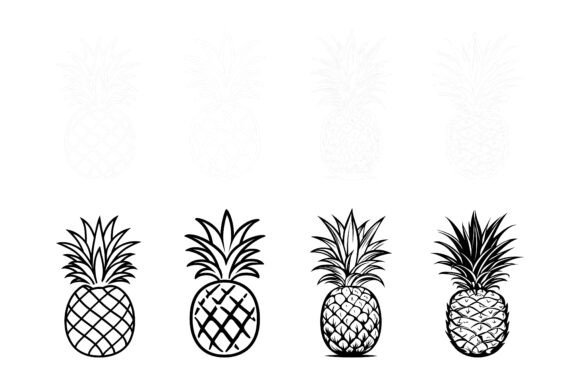
Pineapple Set: Fresh Illustration Assets That Fit Right Into Your Visual Projects
Finding the right illustration can eat up hours of your time. You scroll through endless libraries, download a few promising files, and then realize they don't quite match your project's tone or the colors feel off. The Pineapple Set takes a different approach. It gives you a curated collection of pineapple-themed vector illustrations that work across multiple platforms and adapt to your specific needs without forcing you into a rigid style.
What makes this particular set useful is how it balances detail with flexibility. Whether you're updating a restaurant menu, designing a summer event flyer, or sprucing up an educational handout, these illustrations have enough character to stand on their own but remain open enough for you to tweak, recolor, and reshape without breaking the original composition.
Where the Pineapple Set Actually Gets Used
It's easy to assume a pineapple illustration has limited applications. But once you start looking at how designers, marketers, and everyday creators put assets like these to work, the range of possibilities expands quickly. Here are some of the most common scenarios where the Pineapple Set fits naturally into real workflows.
Hospitality and Food Branding
Restaurants, juice bars, food trucks, and bakeries constantly need fresh visual material for menus, signage, social posts, and packaging. A well-drawn pineapple illustration brings a tropical, welcoming feel without feeling gimmicky. Because the set includes AI EPS and JPG formats, a cafe owner can drop a pineapple icon into a printed drink menu while their social media person uses the same graphic for an Instagram story—and both versions stay crisp and properly scaled.
If the brand colors lean more toward muted pastels rather than bright yellows and greens, no problem. The vector format means you can change colors and modify the icon easily until it matches the aesthetic you already have, rather than redesigning your brand around a piece of clip art.
Website and App Interface Elements
Designers building landing pages, mobile apps, or dashboard interfaces often reach for illustrations to break up text and guide the user's eye. Pineapple motifs work surprisingly well for categories like food delivery apps, wellness platforms, travel booking sites, or any product that wants to evoke warmth and hospitality.
The neatly organized file and layer structure saves real time here. Instead of digging through a flattened mess of shapes to isolate one element, you can open the file, locate the layer you need, and export exactly the icon or illustration section you want. This matters when you're iterating quickly and can't afford to spend twenty minutes cleaning up source files.
Print Materials That Demand Consistency
Event planners, print shop owners, and stationery designers know that what looks good on screen doesn't always translate to paper. Pixelation, color shifting, and scaling issues can ruin a perfectly good layout. Since the Pineapple Set is suitable for print, web, symbols, apps, and infographics, you don't have to second-guess whether the file will hold up at 300 DPI on a poster or shrink down cleanly for a business card logo.
One print designer mentioned using pineapple elements across an entire wedding suite—save-the-date cards, table numbers, thank-you notes, and even wax seals. The consistency in details meant each piece looked like it belonged to the same family, which is exactly what clients want when they pay for a cohesive stationery set.
Educational and Infographic Content
Teachers, curriculum developers, and instructional designers often hunt for visuals that clarify rather than distract. A pineapple illustration might illustrate concepts in biology, agriculture, nutrition, or even economics if you're discussing tropical imports. The clean, recognizable silhouette helps learners process information faster than abstract icons or overly complex diagrams.
Since the files are designed for Mac and Windows users, educators working across different school computer systems won't hit compatibility roadblocks. An elementary teacher on a Windows laptop and a university lecturer on a MacBook can both open, edit, and use the same assets without special software or file conversion gymnastics.
What Different Users Gain From These Illustrations
Not everyone approaches the Pineapple Set with the same goal. A small business owner needs different things from a freelance illustrator than a blogger or a marketing manager does. Understanding how the set serves each type of user makes it easier to decide whether it fits your situation.
Small business owners benefit from the ability to produce polished-looking materials without hiring a designer for every update. When you can open an editable file, change a few colors to match your logo, and drop it into a Canva layout or a printed flyer, you maintain a professional look on a modest budget.
Freelance designers and agencies value the perfection in details and consistency across the set. When a client project calls for multiple pineapple-themed graphics, having them all share the same line weight, shading style, and level of detail prevents that awkward patchwork look that comes from combining assets from different creators.
Content creators and bloggers often need visuals that feel current but not trendy. Pineapples have been a staple symbol in lifestyle, food, and travel content for years, and they don't seem to be going anywhere. A solid illustration set gives you reliable go-to graphics for featured images, Pinterest pins, or newsletter headers without constantly buying new stock assets.
Realistic Scenarios Where Pineapple Illustrations Solve Problems
Let's move beyond theory and look at specific moments when having this set on hand actually prevents headaches.
Scenario one: You're running a summer promotion for a smoothie shop. The flyer needs to go out tomorrow, the printer needs vector files, and the social media manager wants matching graphics for Facebook and Instagram. With the AI and EPS files, you pull the main pineapple illustration, recolour it in the shop's coral and mint palette, export the print-ready version, and hand off resized JPEGs for social. Everything ships on time and looks unified.
Scenario two: A nonprofit is creating an infographic about sustainable farming in tropical regions. The pineapple illustration anchors a section about crop diversity. Because the layer structure is organized, the designer isolates just the fruit without the leafy crown, pairs it with data points, and creates a clean visual that communicates the message without clutter.
Scenario three: A craft blogger designs printable stickers for a summer planner collection. She opens the EPS file, simplifies a few shapes to suit the sticker aesthetic, and creates a sheet that her audience loves. The editable nature of the illustrations means she's not starting from scratch but she's also not stuck with someone else's exact creative vision.
Things to Consider Before Adding the Pineapple Set to Your Toolkit
No illustration set fits every single purpose, and being honest about what this collection does and doesn't offer helps you make a smarter decision.
First, think about your primary use case. If you mostly need photographic imagery or hyper-realistic 3D renders, vector illustrations won't fill that gap. The Pineapple Set shines in flat design, icon-style, and moderately detailed vector work—not photo-realism.
Second, consider your editing comfort level. While the files are organized and layer-structured, you still need vector editing software like Adobe Illustrator, Affinity Designer, or similar tools to take full advantage of the AI and EPS formats. The included JPEGs work anywhere, but the real value comes from editing the vectors. If you're comfortable with those programs, you'll get much more mileage from the set.
Third, evaluate frequency of use. Buying an illustration set makes the most financial sense when you expect to use pineapples or tropical motifs across multiple projects over time. If you only need one pineapple graphic once, a single stock download might serve you better. But for ongoing branding, recurring seasonal content, or client work that cycles through food and lifestyle themes, having an entire cohesive set ready to go cuts down on repetitive sourcing.
Also worth noting: the suitability for print, web, symbols, apps, and infographics means you're not locked into one medium. A restaurant group might use the same pineapple graphic on window decals, a website header, an app icon, and takeout packaging. That kind of cross-platform consistency strengthens brand recognition in ways that mismatched assets never will.
How the File Formats Shape Your Workflow
The combination of AI, EPS, and JPG formats covers different stages of a project. AI files preserve full editability and typically open natively in Adobe Illustrator. EPS files offer broader compatibility with older software and some non-Adobe applications. JPG files serve as quick previews or ready-to-use web graphics when you don't need to edit anything.
This mix means you can share the JPEGs with a client for approval while still refining the vector version, or hand off an EPS to a printer who uses CorelDRAW without worrying about file conversion errors. The design for Mac and Windows users removes another layer of friction—team members on different operating systems won't encounter font substitution problems or broken file paths.
Making the Most of the Pineapple Set in Everyday Projects
People who get the most value from these illustrations tend to use them as starting points rather than finished pieces. They change the stroke width, adjust the color palette, combine elements from different illustrations, or simplify parts of the design to fit a minimal style. The organized layer structure encourages this experimentation because you can modify one element without accidentally altering everything else.
A stationery designer described it this way: she treats each illustration like a recipe she can adjust. Maybe the original pineapple has a certain green-to-yellow ratio, but her client's brand uses deep teal and gold. She opens the file, swaps the colors in minutes, and delivers something that feels custom-made rather than off-the-shelf.
This adaptability matters more than ever when visual content needs to work across so many different platforms. A blog header, a printed brochure, and an Etsy listing thumbnail all have different compositional needs, but starting from the same base illustration ensures the core visual identity stays recognizable across all of them.
The Pineapple Set ultimately serves people who want quality vector illustrations without the rigidity that often comes with pre-made assets. Whether you're updating seasonal marketing materials, building out a food blog's visual library, teaching a classroom concept with clear visuals, or adding tropical accents to a client's branding package, having these illustrations ready—and knowing you can reshape them to your exact needs—changes how quickly and confidently you move through creative work.